
Turn YouTube videos into usable summaries and prompts without leaving Chrome.
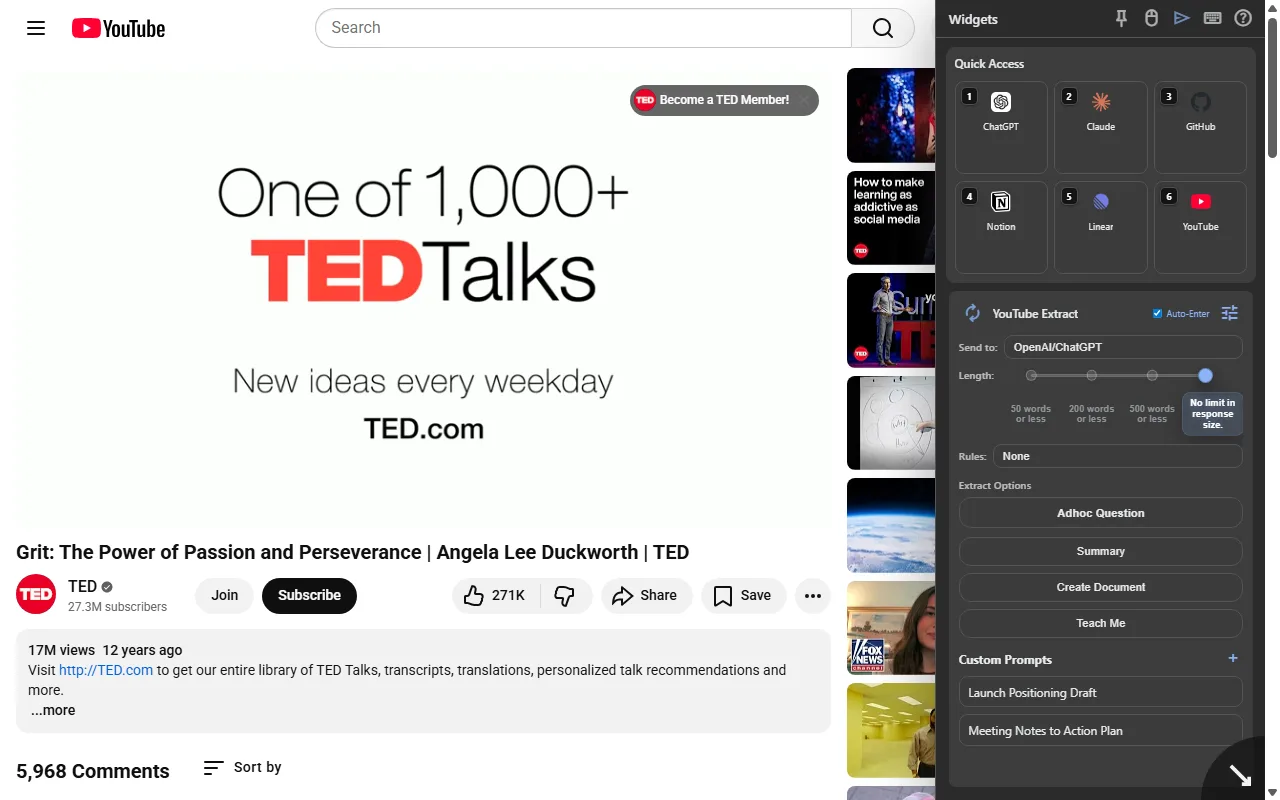
Open YouTube Extract beside the video, capture its transcript, choose a summary or custom prompt, and send the prepared context into the AI tools you already use.
How it works
A shorter path from intent to finished work.
- 01
Open the sidebar on YouTube
Keep the video visible while Synapse opens the extraction workflow beside it.
- 02
Choose what you need
Use a summary action or select a reusable custom prompt for the transcript.
- 03
Send prepared context to AI
Route the transcript and instruction into selected supported AI sites for the final response.
FAQ
Before you install.
Clear answers about what Synapse does and how it fits into Chrome.
Does Synapse summarize the video by itself?
Synapse extracts and prepares the transcript, then sends the context and your chosen instruction to supported AI tools for the response.
Can I use a custom prompt with a YouTube transcript?
Yes. You can select prompts from the Synapse Prompt Library or configure a custom extraction instruction.
Do I have to leave the YouTube page?
No. YouTube Extract runs in the Synapse sidebar beside the open video.
Put this workflow one click away.
Install Synapse from the Chrome Web Store and keep the tools you reuse inside the browser.